CMMN Basic Training - xAPPnow Low Code Platform
The CMMN training of the xAPPnow Low Code Platform will familiarize you with the basic concepts of dynamic case management which is based on the CMMN standard. The training is recommended for CMMN beginners and is a precondition for the Advanced Training. The user will be able to use CMMN for business analysis and to implement prototypes using Low Code. Such prototypes could then be seamlessly used by the IT department for further digitalization. Most of the training samples can also directly be tested online in the xAPPnow User Portal.
Remark: We recommend that you execute the Basic Training and BPMN Training first before you start this training to get familiar with the general usage of the xAPPnow Low Code Platform as well as business process management.
Business Process Management (BPM) vs. Dynamic Case Management (DCM)
Dynamic case management (also called adaptive case management) has become the new standard of managing work. It allows you to not only manage work in a structured way, like processes of traditional business process management, but also less structured, adhoc and more collaborative.
What is the difference between DCM and BPM?
Business process management mainly focuses on defining, optimizing and automating structured, repeatable processes. In general BPM is mainly about increasing efficiency, straight through processing and reducing human interactions required to execute a process. As a sample a finance department may use BPM to automate the billing and invoicing process.
In contrary, dynamic case management, focuses on unstructured and ad hoc processes. They are not repeatable and often require extensive human interactions and decisions to achieve the result. In healthcare a doctor may use DCM to decide the best course of action for a patient, for instance.
Training Chapters
The training consists of the following chapters, where chapters marked in bold are containing exercises.
Create your personal Training Project
Before starting the training you should create your personal training project to view the models of the training and to execute the exercises of the training.
You can create the project directly after login into Modeling Studio using the "User Projects" dialog or you can use the submenu "Create Project..." from the "Project" menu of Modeling Studio.
-
We recommend to use a project name like "Training CMMN - Username" to easily manage your projects in the runtime environment (User Portal, Camunda).
-
Enter a project short description
-
Select "Tutorial" to load projects from domain "tutorial"
-
Select "Tutorial - DCM" as project template to create the training project.

xAPPnow User Portal - DCM Menu Functions:
In addition to the CMMN introduction, you will also get familiar with DCM related menu functions "My Cases" and "Case Definition" of the xAPPnow User Portal.
-
Menu "My Cases": This menu function provides you with the management of your personal cases, which are currently active
-
Overview of active cases
-
Open subdialog "Case Tasks" to view related tasks and to activate available tasks of the selected case
-
Terminate a personal case

-
Subdialog "Case Tasks": This subdialog provides you with the tasks management of the selected active case
-
Overview of active and available tasks of the case
-
Activate available tasks of the case

Remark: An active human task of a case plan is displayed in the task list of the responsible user:
-
Menu "Case Definition": This menu function provides you with the management of case plan definitions
-
Overview of case plan definitions
-
Start a case plan instance
-
Open subdialog "Case Plan Definition Instance" to view the related instances of a case plan definition
-
Delete a case plan definition and related instances

-
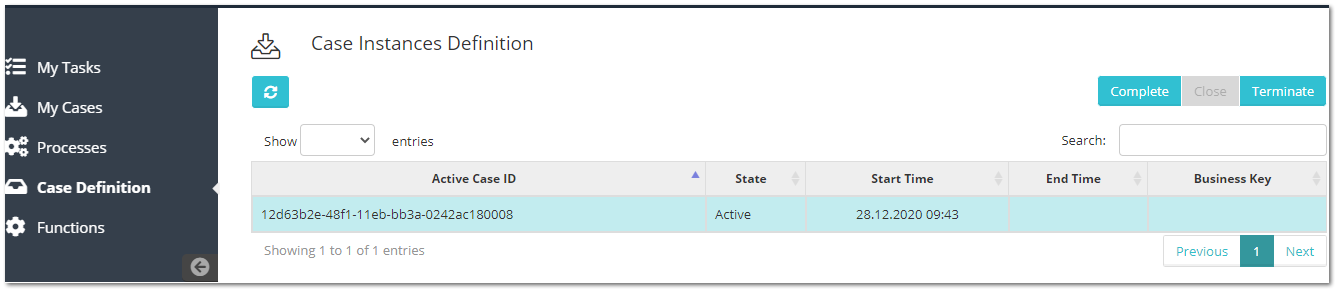
Subdialog "Case Plan Definition Instance": This subdialog provides you with the management of instances of the selected case plan definition
-
Overview of case plan definition instances
-
Complete an instance
-
Close an instance
-
Terminate an instance