
Full Stack Refactoring - xAPPnow Low Code Platform
The Modeling Studio of the xAPPnow Low Code Platform contains an extensive and efficient Full Stack Refactoring of a project, like rename, update or delete of business objects, models or folders is one of the strength of xAPPnow, as most of the refactoring can be done automatically.
For the Rename of objects, models and folders please take a look at the Reserved Words.
By default there is a button "Refactoring" enabled on the Toolbar. In case the user disable it the refactoring of the project should be executed manually by the user. See Toolbar topic.
The rename and delete of models and folders are automatically refactored using the Model Tree options. See Create, rename, delete Model and Folder. In case of a model delete a dialog showing all usages is displayed before apply the refactoring.
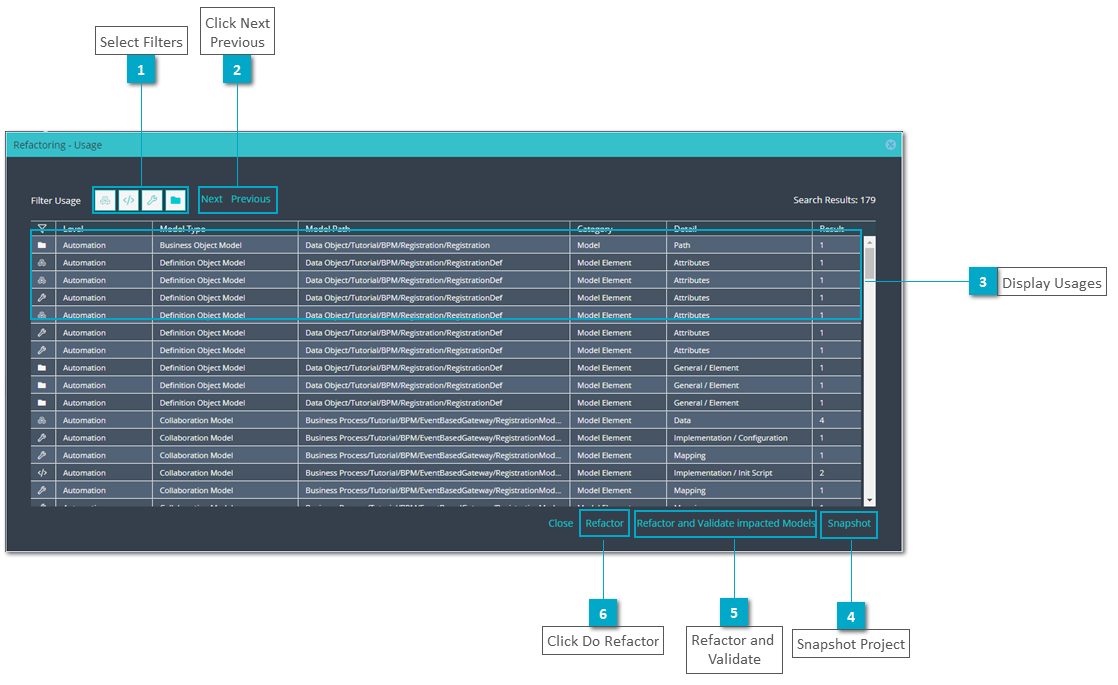
The rename of objects and attributes on Data Object models and on Data TAB displays a spinner while the action is executing. Also on delete of attribute and object same dialog "Refactoring - Usage" is displayed. If this dialog is closed without done the refactor action it could be opened using the button "Show Usages" on the Toolbar.
Another refactoring action takes place while moving models and objects. To move a model just Drag&Drop into different location on Model Tree. Objects can be moved or copied using it's context menu. See Context Menu - BOM Elements



 Snapshot Project Create a snapshot of the project as a backup in case you want to revert to the previous version. See Project - Version Management
|



