

Progressive web apps (PWAs) are changing our everyday digital lives. They are fast, reliable and offer a user experience that can keep up with native apps - all directly in the web browser. Learn how PWAs work, why they can be an asset to your digital project and what challenges you need to consider when developing a PWA.
The most important facts at a glance
Progressive Web Apps (PWAs) combine the advantages of websites and native apps by offering platform independence and also working offline, with service workers and the Web App Manifest playing a central role.
PWAs offer significant advantages for various industries such as e-commerce and media, such as improved loading times, offline functionality and reduced development costs, which positions them as an alternative to native and hybrid apps.
The implementation of PWAs has technical requirements such as the use of HTTPS and poses challenges, especially in terms of compatibility and functionality on iOS devices.
Basics of Progressive Web Apps
Progressive Web Apps (PWAs) are hybrid applications that combine the best features of classic smartphone apps and traditional websites. They are secure, easy to find and install, and provide a user experience that works regardless of network status. This means that PWAs, as a Progressive Web App, also work offline, which sets them apart from traditional websites. One of the main advantages of PWAs is their adaptability. Progressive Web Apps can be used on any device, regardless of whether or not that device or the browser used is compatible with all of the application's features.

What makes an app "progressive"?
An app becomes "progressive" through the use of service workers and the Web App Manifest, which enable an improved user experience and offline function. Service workers are scripts that run in the background of a website and enable functions such as content caching to be performed regardless of the state of the website. The Web App Manifest is a JSON file that provides basic information about the Progressive Web App and enables a uniform presentation of the app on different platforms. Through these technologies, PWAs deliver an app-like user experience, regardless of the platform or device used.
The role of service workers
Service workers are a central component of every progressive web app. They are scripts that run in the background of a website and enable functions such as content caching, regardless of the state of the website. By caching information, service workers can improve the performance of a PWA by:
Load content in advance
Enable fast response times to user requests
Make content available even with a poor or no Internet connection
This leads to an improved user experience. It is important to note that HTTPS is essential for the operation of service workers, as it provides the necessary security basis for the reliable execution of their functions.
Significance of the Web App Manifesto
The Web App Manifest is another key component of a Progressive Web App. It is a JSON file that provides basic information about the PWA. The manifest defines the appearance during the use of the Progressive Web App and enables a uniform appearance and behavior of the PWA on different platforms. This improves the user experience by creating a similarity to native apps.
Another important aspect of the Web App Manifest is the "Add-To-Homescreen" function. It allows users to install the PWA on their home screen like a native app.
Implementation and application areas of PWAs
Progressive web apps offer companies a way to stand out and connect with their customers. They combine the best features of websites and mobile apps and offer high interaction and flexibility. This makes them particularly attractive for industries such as:
E-Commerce
Gastronomy
Tourism
Media
In addition, sales representatives can use Progressive Web Apps to access products or services offline on a cell phone, tablet or PC, which can be used in the form of offline catalogs.
E-commerce and PWAs
In e-commerce, PWAs can make a big difference. They are inherently SEO-friendly, resulting in better search rankings and increased organic traffic that drives more potential customers to e-commerce platforms. In addition, due to instant page loads, visitors spend more time on Progressive Web Apps compared to traditional websites, which also contributes to lower bounce rates and therefore better page turnover on the website.
The offline function of PWAs in e-commerce allows users to browse products and potentially complete purchases without an internet connection.

PWAs in the media industry
The offline capabilities of Progressive Web Apps are particularly effective for media companies. They ensure that news portals and information sites remain accessible even in areas with poor network connections. In addition, media portals using PWAs can offer their readers the ability to save articles and other content for offline reading, increasing time spent on the site and user engagement.
PWAs for small and medium-sized enterprises
Progressive web apps are a financially accessible option for small and medium-sized companies. Development costs can be as low as 5,000 dollars, making them an affordable alternative to native and hybrid apps.
In addition, PWA's unified development approach eliminates the need for separate versions for different operating systems, reducing costs and development time for small businesses.
Differences between PWAs and other types of app
PWAs combine the features of a native app with the characteristics of a website. They are accessible via the home screen and can be used on different operating systems, including desktop, without customization. However, it is important to note that PWAs also have some limitations compared to native apps. For example, they have limitations in terms of storage space and access to device functions, as well as limitations in terms of possible uses compared to hybrid apps, as they are executed in the browser.
Comparison of PWA with native apps
Compared to native apps, PWAs:
less expensive
cross-platform
only need to be developed once
can be used on different devices and operating systems
PWAs offer a similar user experience to native apps and can access certain device functions such as camera and geolocation, but have limitations compared to fully native applications. In addition, PWAs may not be published in app stores and are limited in their functions, especially on iOS platforms.
PWAs vs. hybrid apps
Compared to hybrid apps, PWAs offer the following advantages:
Better performance
Lower memory requirements
Faster loading times
Offline capability
No installation required
However, PWAs are limited in their use of native functions. Hybrid apps, on the other hand, are created using web technologies and run in a container that enables access to native functions. They can be published in app stores, but are generally larger than native apps and have restrictions on the use of native functions. Visually, hybrid apps and native apps are usually indistinguishable for the end user.
Technical requirements for PWAs
The use of HTTPS is a fundamental requirement for the security and functionality of PWAs. PWAs offer the following advantages:
They remain fully indexable in search engines, which improves findability and SEO.
They offer a better user experience as they function like a native app.
They are platform-independent and can be used on different devices and operating systems.
They can be used offline, which is particularly advantageous for mobile users.
However, it is important to note that developing a PWA community and established best practices is a challenge as PWAs are a relatively new technology.

Security through HTTPS in PWA
HTTPS is essential for PWAs to provide a secure transmission protocol that ensures the integrity and confidentiality of the application using Web App Manifest and TLS (SSL). HTTPS prevents the interception or manipulation of data by encrypting HTTP requests and responses and ensures that a server is authentic using SSL/TLS encryption. Web browsers such as Chrome mark pages without HTTPS as 'not secure', directly influencing users' perceived security and trust in the site.
PWA Responsive Design and User Experience
A responsive design enables a PWA to adapt to different device environments and user expectations. The app shell ensures that a mobile view of the URL is generated and the PWA is adapted to the functionality of the respective browser. Content should be rearranged at different view sizes to prioritize important data and actions, and semantic HTML should be used to support all user input methods.
Integrate push notifications into PWA
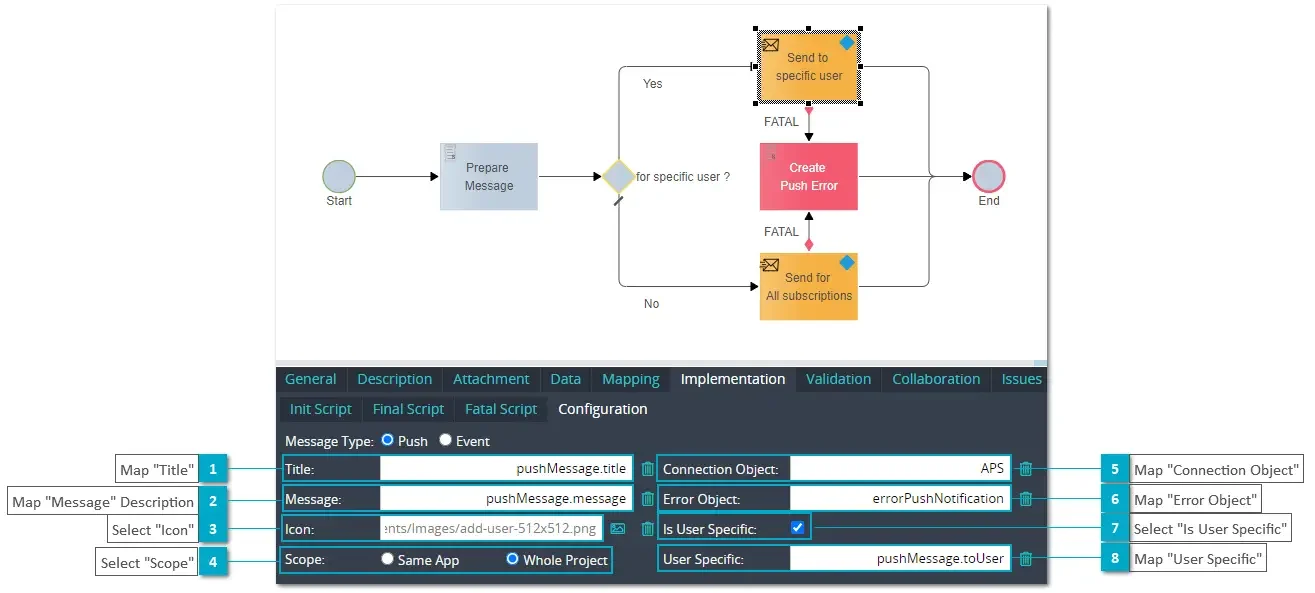
The Web App Manifest enables the sending of push notifications that appear directly on the user's device, even if the PWA is not being actively used. To implement and control push notifications, it is necessary to integrate a service worker, which must be checked for conflicts with other service workers and adapted accordingly.
Low-code platforms, such as xAPPnow, simplify the implementation of push notifications by allowing them to be configured simply by drag and drop without the need for complex programming (see graphic).
Advantages and challenges of PWAs
PWAs offer numerous advantages, including:
- a native-like user experience
- Lower development costs compared to native apps
- the ability to index content for search engines
- Automatic update with every call
- Saving device resources
- No mandatory internet connection required
- Platform-independent and testable online
Improved loading times and performance
Thanks to fast loading times and an optimized user experience, PWAs enable the use of content on all devices, even with a poor or no internet connection. They offer fast loading times and offline access by storing content in the device's cache, making it usable even without an internet connection. A service worker enables applications to be loaded more quickly, as content is stored and there is no need to wait for a server response.
Challenges during implementation
Despite the many advantages of PWAs, there are also some challenges. On iOS devices, especially in the Safari browser, there are various technical problems, including the functions for adding to the home screen and push notifications. When implementing a PWA, there can be difficulties with the storage of data, such as the handling of orders and the timeliness of availability displays. In addition, many companies have a preference for native apps, which are perceived as a status symbol and therefore inhibit the spread of PWAs.
Create PWA with low-code platforms
Low-code platforms are tools that make it possible to create applications with little or no coding. They offer an intuitive development environment and enable the development of PWAs in a simpler and more cost-effective way.
PWA advantages
Low-code platforms offer a number of advantages for the development of PWAs. They enable accelerated development time, which leads to faster time-to-market and cost savings. The use of low-code platforms with easy-to-learn drag-and-drop graphical programming capabilities allows non-programmers to participate in the realization of applications and make adjustments.
Low-code platforms offer the following advantages:
- They are easily customizable
- They make it possible to react quickly to changes in requirements or in the market
- They can lead to an improved return on investment (ROI).
Acceleration of PWA development through low-code platforms
The use of low-code platforms can significantly accelerate the development of PWAs. Here are some of the advantages:
- By using drag-and-drop elements and easily integrated APIs, development processes can be simplified and time-consuming tasks reduced.
- Low-code platforms also enable less experienced developers to participate efficiently in the development of applications.
- This increases efficiency in the development process.
xAppnow offers a comprehensive set of application components specifically tailored for PWA development, including an extensive set of more than 50 widgets and templates for common PWA functions.
Examples of low-code platforms
There are various low-code platforms that can be used to develop PWAs:
- Mendix offers advanced features, including artificial intelligence, that make it possible to create intelligent enterprise applications.
- OutSystems supports the rapid development and deployment of applications with the flexibility to add custom code as needed.
- As a low-code platform, Appian makes it easy to create applications by using visual programming and automatic code generation.
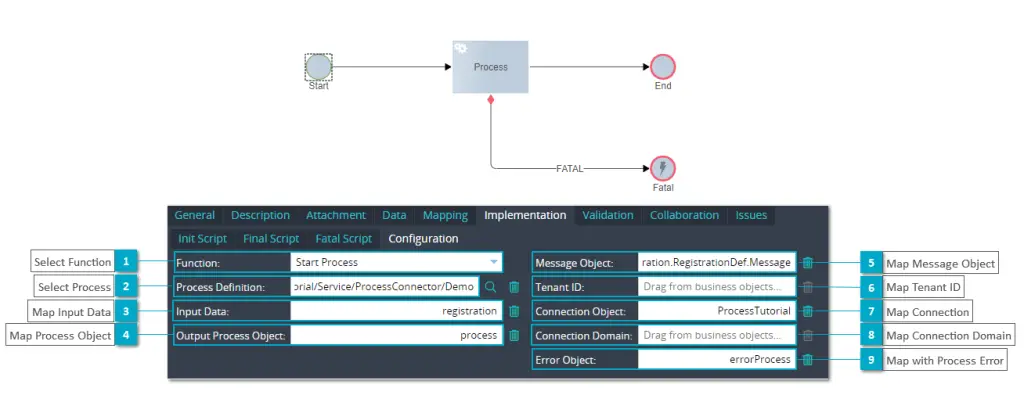
- xAppnow offers both the implementation of sophisticated PWA, including AI, and the integration of any number of complex processes that are digitized on the basis of the BPMN standard (see graphic).
Other examples of low-code platforms are Zoho Creator, Microsoft Power Apps, Caspio and Visual LANSA.
Success stories and case studies
There are numerous examples of successful implementations of PWAs. Google has supported Progressive Web Apps due to their ability to adapt to the client and deliver content like native apps on all platforms. The Starbucks PWA improved the customer experience by providing features that are also available offline and helped increase online orders.
The paper manufacturer Klabin used Progressive Web Apps to create a digital workplace, which strengthened the digital corporate culture and led to a high level of acceptance among employees.
Other examples of progressive web apps are: Continental AG, News Portal Nau.ch, Tourismus NRW E.V., Google Maps Go, Facebook, Lotto.de, NASA, and Petlove.
Summary
Progressive web apps represent a significant shift in the way we develop and use applications. They combine the best features of websites and mobile apps and offer an adaptable, secure and network-independent user experience. PWAs are flexible and customizable, making them an ideal solution for a variety of applications.
Although they come with some challenges, particularly in terms of conventional high-code implementation and compatibility with iOS, they offer numerous advantages that make them an attractive option for developers and companies.
Finally, implementation via low-code should always be considered. With xAPPnow you can implement your first PWA within minutes. Get started now for free!
Frequently asked questions
What does the term PWA mean?
A Progressive Web App (PWA) is a website that has many of the functions of mobile apps and is a fusion of a responsive website and an app. PWAs can function offline and send notifications.
What can't a PWA do?
PWAs cannot use all native functions of the end device, may not be fully supported in all browsers and cannot be distributed via conventional app stores. Therefore, customers may have problems finding PWAs.
How to install a PWA?
Open the desired website in the Chrome browser and click on "Install" in the top right-hand corner. Follow the instructions to install the PWA. You can then install the PWA on your smartphone by selecting "Add to home screen" in the browser menu.


