xAPPnow LOW CODE PLATFORM - User Manual 

Still no account yet?

×

Training Update Tutorial


Overview

 
The goal of this topic is to train you in the update of projects of domain "Tutorial". The Modeling Studio domain administrator is the responsible for update projects.


Exercise

In this exercise you will delete first an old version of a tutorial, create again a new project from scratch and import the new version of tutorial. To start this training you must Log in into Modeling Studio using credentials of the Tutorial Domain Administrator.
 
Exercise 1: Delete old version of a tutorial
 
  • Step 1: Open menu "Administration" to select option "Project Management"
 
 
Training Update Tutorial
 
 
  • Step 2: Select project "Process Digitalization" and click button "Delete"


Training Update Tutorial


Exercise 2: Create Project
 
  • Step 1: Enter project Name "Tutorial - Process Digitalization" and click button "Add"
 
 
Training Update Tutorial
 
 
  • Step 2: Open menu "Administration" to select option "Project User Management"
 
Training Update Tutorial
 
 
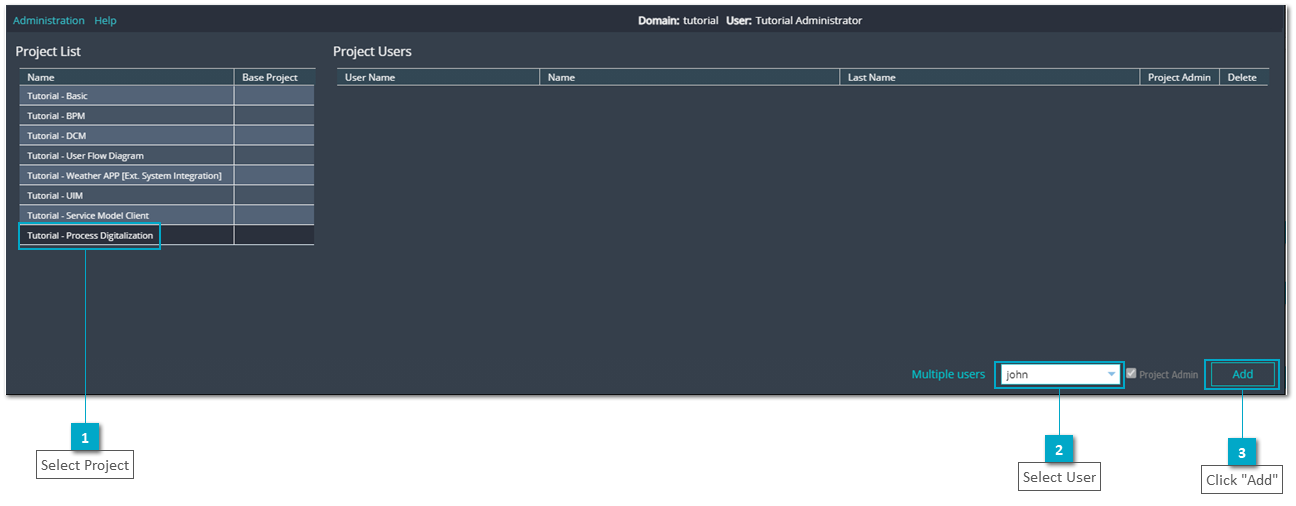
  • Step 3: Select project "Tutorial - Process Digitalization" select a user on combobox and click button "Add" to assign a user to the project
 
 
Training Update Tutorial
 
 
Exercise 3: Import new version of project
 
  • Step 1: Log in with the assigned user and click to select the new created project on dialog "User Projects"
 
 
Training Update Tutorial
 
  • Step 2: Click menu "Project" and select option "Import"
 
 
Training Update Tutorial
 
 
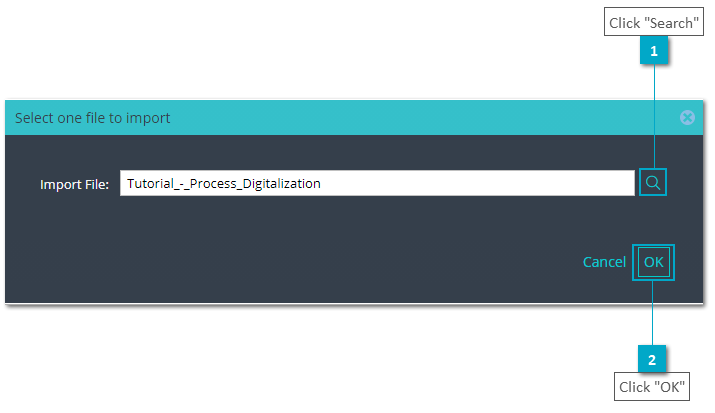
  • Step 3: Search the new project version path and click button "OK" to import the new version
 
 
Training Update Tutorial
 
 
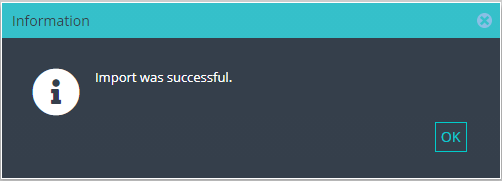
  • Step 4: Verify the Import was succesfully done.


1

Click "Administration"

1. Click "Administration"
Click menu "Administration"
2

Select "Project Management"

2. Select "Project Management"
Select option "Project Management"
 
 
1

Select Project "Tutorial - Process Digitalization"

1. Select Project "Tutorial - Process Digitalization"
Select project "Process Digitalization" from "Project Management" grid
2

Click "Delete"

2. Click "Delete"
Click button "Delete" to remove the project from the domain
 
1

Enter Project Name

1. Enter Project Name
Enter project Name "Tutorial - Process Digitalization"
2

Select all languages

2. Select all languages
Click to select all possible languages
3

Select "Default"

3. Select "Default"
Select the default option
4

Click "Add"

4. Click "Add"
Click button "Add" to create a new empty project
 
1

Select "Project User Management"

1. Select "Project User Management"
Open menu "Administration" to select option "Project User Management"
 
1

Select Project

1. Select Project
Select project "Tutorial - Process Digitalization"
2

Select User

2. Select User
Select a user on combobox
3

Click "Add"

3. Click "Add"
Click button "Add" to assign a user to the project
1

Select Project

1. Select Project
Click to select the new created project on dialog "User Projects"
1

Click "Project"

1. Click "Project"
Click menu "Project"
2

Select "Import"

2. Select "Import"
Select option "Import"
1

Click "Search"

1. Click "Search"
Click button "Search" to load the new version of the project
2

Click "OK"

2. Click "OK"
Click button "OK" to import last version