
Training Platform Installation
Overview
The goal of this topic is to train you in the installation of xAPPnow Low Code Platform. The platform administrator is the responsible of the installation.
Exercise
In this exercise you will install docker images, install an external PostgreSQL server and finally install xAPPnow platform. xAPPnow Low Code Platform is distributed as a tar archive which needs to be unpacked to separate directories.
The following pre-installation tasks have to be done:
-
download docker images file cloud-image-project.tar
-
download the bundle appollo-install-base-bundle.tar from the URL provided by xAPPnow Systems.
-
download the file proxy-<version>.tar from the URL provided by xAPPnow Systems.
-
obtain license file and mail configuration file mail-config.properties, both files given by xAPPnow team.
Exercise 1: Install xAPPnow Docker Images
-
Step 1: Decompress cloud-image-project.tar using the following command:tar -xvpf cloud-image-project.tar
-
Step 2: Install xAPPnow Docker Images:cd cloud-image-project
chmod +x setup-images.sh
./setup-images.sh appollo
-
Step 3: Verify xAPPnow Docker Images:
docker image ls
It should look similar to this:
REPOSITORY TAG IMAGE ID CREATED SIZE
appollo-systems/tomcat 9-java11-git d8288042a7cb 7 months ago 424MB
tissca/camunda-bpm-platform 7.13.0 9c773d0a9146 9 months ago 258MB
tissca/tomcat latest c0ef517d959d 12 months ago 326MB
tissca/postgres 11.2 65315d56ee80 13 months ago 325MB
tissca/tomcat 8.5.34 ca9e2fccef98 2 years ago 463MB
alpine latest 11cd0b38bc3c 2 years ago 4.41MB
appollo-systems/httpd 2.4.46 d5995e280a0e 2 years ago 194MB
dpage/pgadmin4 2.0 eb84c393799e 3 years ago 526MB
tissca/tomcat paramed_noshutdown fb7fbc4b5317 4 years ago 324MB
Exercise 2: Install External PostgreSQL Server
-
Step 1: Decompress appollo-installation-cloud-<version>-bundle.tar on an empty user directory APPOLLO_HOME
tar -xvpf appollo-install-base-bundle.tar -C <APPOLLO_HOME>
Parameter Explanation:
-
APPOLLO_HOME is the root directory for the installation
-
Step 2: Create file with external postgresql server password
-
Step 3: Give permission to the file using the following command:
chmod 600 <POSTGRES_PASSWORD_FILE>
Parameter Explanation:
-
PASSWORD_FILE - file with postgresql server password
-
Step 4: Change current directory to APPOLLO_HOME
cd <APPOLLO_HOME>
-
Step 5: Execute install command
./appollo-install-postgres.sh --name <CONTAINER_NAME> --port <PG_PORT> --pg-password-file <PASSWORD_FILE> [--network-instances <NETWORK_INSTANCES>] [--db-archive-path <MOUNT_VOLUME_PATH>]
Parameter Explanation:
-
CONTAINER_NAME - The postgresql container to be used
-
PG_PORT - The port for the PostgreSQL Server
-
NETWORK_INSTANCES can specify multiple networks to be linked. A network instance is for example a network used by appollo installation containers, automatically created during installation. Using a link to network allows dwh service to connect to postgresql external container using its container name as a dns name in dwh configuration.
-
MOUNT_VOLUME_PATH is a directory to mount database container backup volume used for log shipping.
Exercise 3: Install xAPPnow
-
Step 1: Change current directory to APPOLLO_HOME
cd <APPOLLO_HOME>
-
Step 2: Execute install command:
./appollo-install.sh --name <INSTANCE_NAME> --port <WEB_PORT> --yf-lic <LICENSE_FILE> [--mail-config <MAIL_CONF>] [--pg-external-name <POSTGRES_EXTERNAL>] [--secrets-conf <SECRETS_FILE>] [--environment-conf-path <ENVIRONMENT_FILE>] [--pg-password-file <PASSWORD_FILE>] [--pg-port <PG_PORT>] [--no-dwh][--enable-kibana] [--db-archive-path <MOUNT_VOLUME_PATH>] [--ldap-config <LDAP_CONF>] [--enable-metrics] [--flush-metrics]
Parameter Explanation:
-
INSTANCE_NAME - An arbitrary user selected name that will be associated with the installation.
-
WEB_PORT - The port used to access the Appollo Low Code Platform web interfaces.
-
LICENSE_FILE - The path to license file
-
MAIL_CONF - is an optional parameter, is the path to a file with email definitions, this configuration allows the system to send mail from processes.
-
POSTGRES_EXTERNAL - is the instance name of another postgresql server, that may be used to host databases. When --pg-external option is not specified, installation uses postgres-server as default instance name.
-
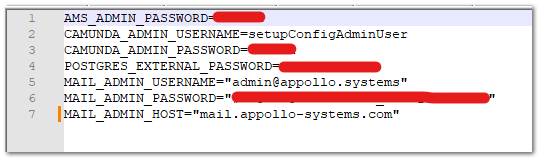
SECRETS_FILE - contains the passwords of the system administrators
-
ENVIRONMENT_FILE - contains the DB internal configuration
-
PASSWORD_FILE is an optional parameter used when the service dwh is to be used. The file contains the password defined for postgresql external database used inside dwh service. When --no-dwh option is used, the service dwh will not be enabled, parameter --pg-password-file is not needed.
-
PG_PORT is xAPPnow postgresql port definition. When used as 127.0.0.1:PORT it means the port is exposed internal to the server, example: 127.0.0.1:54321. See example below. If prefix “127.0.0.1:” is not used the port is exposed external to the server.
-
LDAP_CONF is an optional parameter, is the path to xml file with camunda ldap integration configuration in case ldap integration for authentication is to be used.
-
--enable-kibana option is used to visualize services logs on kibana.
-
--enable-metrics option is used to enable metric reports on camunda.
-
--flush-metrics option allows to flush camunda metrics table.
Example:
./appollo-install.sh --name release --port 8088 --pg-port 127.0.0.1:54321 --yf-lic ../licenseOverrideDeveloper.js --mail-config ../mail-config.properties --pg-external-name postgres-external11 --secrets-conf ../secrets-docker.txt --environment-conf-path ../db-environment-automatic-conf.txt
secrets-docker.txt
db-environment-automatic-conf.txt
