Training Modeling Studio Domain Management
Overview
The goal of this topic is to train you in the management of Modeling Studio Domains. The Modeling Studio system administrator is the responsible for create, update, delete and clone domains in the cases where it is required.
Exercise
In this exercise you will create a new domain "tutorial" from scratch as a first step to configure Modeling Studio. To start this training you must Log in into Modeling Studio using credentials of the System Administrator defined during the installation process.
Exercise 1: Create new domain
-
Step 1: Open menu "Administration" to select option "Domain Management"
-
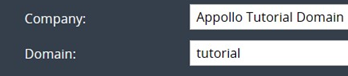
Step 2: Enter the required domain information:
-
Company: Appollo Tutorial Domain
-
Domain: tutorial
-
Step 3: Click button "Add" at the bottom of the page to create the new domain specified.The created domain will be listed on the left area of the screen.