xAPPnow LOW CODE PLATFORM - User Manual 

Still no account yet?

×

User Interface Properties - Types Enum and Error


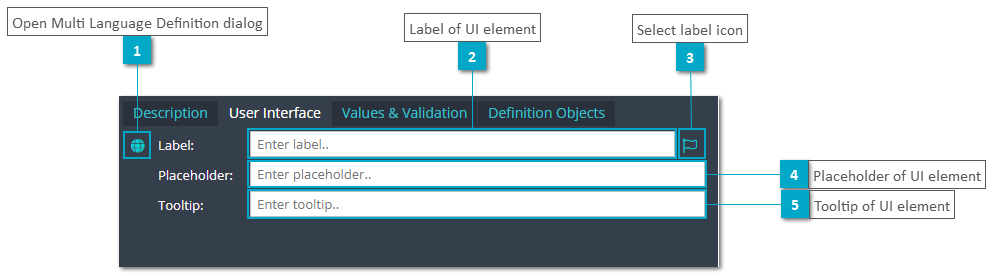
The following screenshot describes the configuration possibilities of the Sub TAB User Interface of the Attributes TAB for the enum and error type attribute.


User Interface Properties - Types Enum and Error
1

Open Multi Language Definition dialog

1. Open Multi Language Definition dialog
Click this button to open the Multi Language Definition dialog.
2

Label of UI element

2. Label of UI element
Enter the label of a UI element for the attribute.
3

Select label icon

3. Select label icon
Select an icon for a label. For more details see Icon Specification.
4

Placeholder of UI element

4. Placeholder of UI element
Enter the placeholder of a UI element for the attribute.
5

Tooltip of UI element

5. Tooltip of UI element
Enter the tooltip of a UI element for the attribute.


