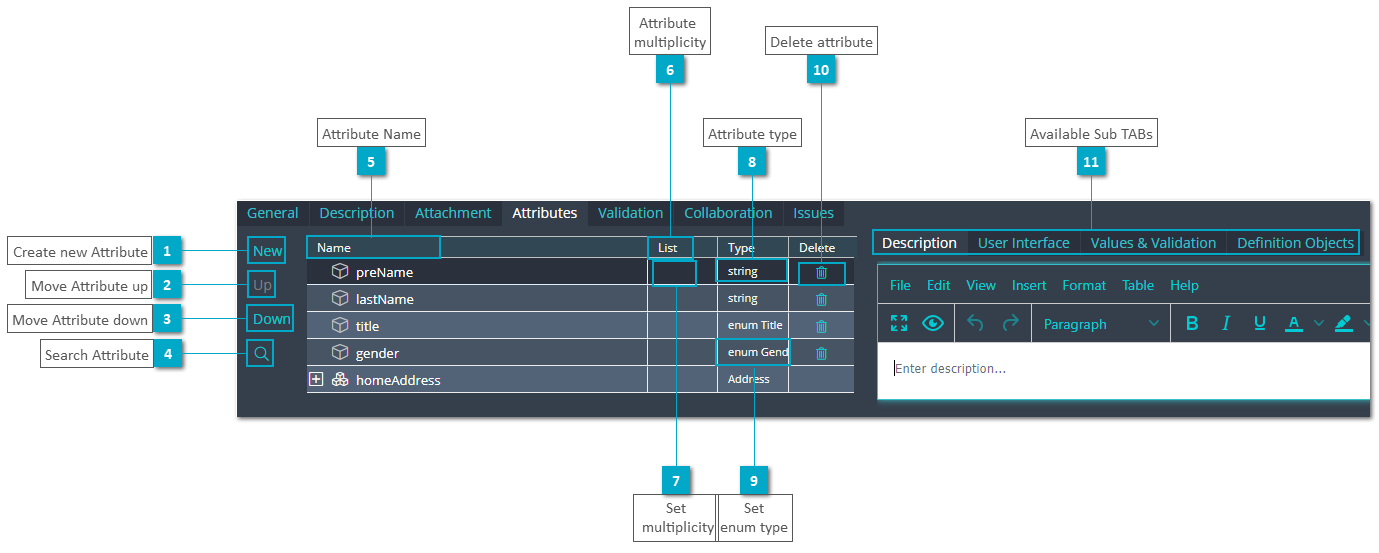
Business Object Attributes TAB
 Create new AttributeClick this button to create a new attribute of simple type.
|
|
 Move Attribute upClick this button to move a selected attribute up.
|
|
 Move Attribute downClick this button to move a selected attribute down.
|
|
 Search AttributeMakes a search for the selected attribute
|
|
 Attribute NameThis column displays the attribute name.
|
|
 Attribute
multiplicityThis column displays the multiplicity of an attribute.
|
|
 Set
multiplicityDouble click this column to specify the multiplicity of an attribute. A multiplicity of an attribute element is displayed as  . .
|
|
 Attribute typeThis column displays the attribute type (business object type, simple type, enum object type, etc.).
|
|
 Set
enum typeDrag & drop an Enumeration Object from Sub TAB Definition Objects to add an enum type attribute. |
|
 Delete attributeClick the trash icon to delete an attribute.
|
|
 Available Sub TABs |
|