Registration of External User - xAPPnow User Portal
Registration for an
External User of an application can be done using the login page for applications or can be created by the domain administrator of the
xAPPnow User Portal using the
"Administration" menu option. See
Domain Administration - External User.
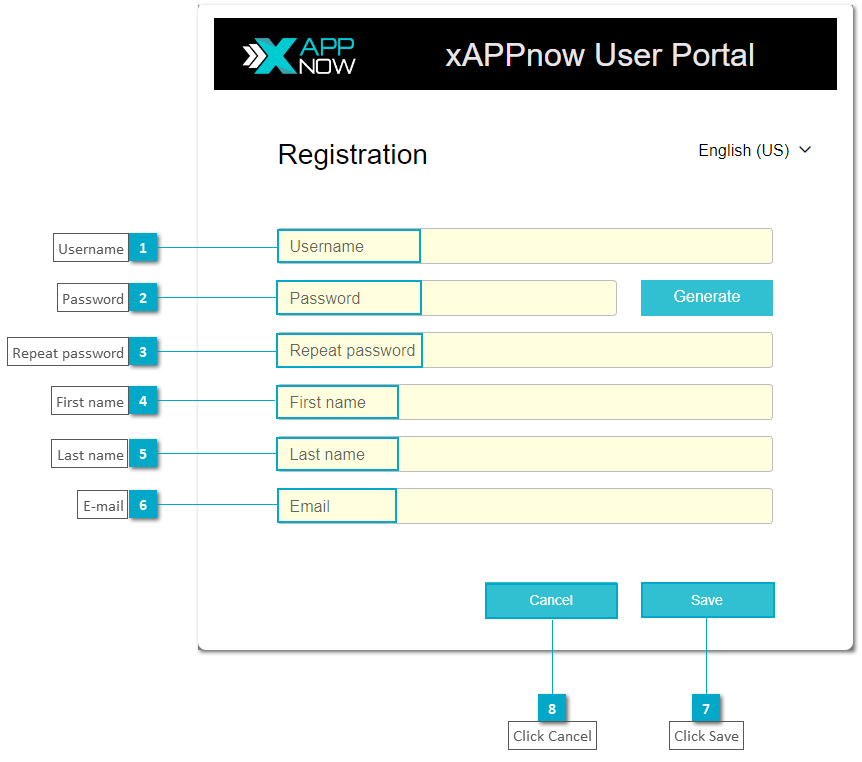
 UsernameDefine the username of the new external user.
|
|
 PasswordIntroduce a password for the new external user.
|
|
 Repeat passwordType the password again to verify it is correct.
|
|
 First nameIntroduce the first name of the user that is being registered.
|
|
 Last nameIntroduce the last name of the user that is being registered.
|
|
 E-mailSpecify the e-mail address of the user. This e-mail will be used to recover the credentials to access User Portal in case the user forget the username or the password.
|
|
 Click SavePress this button to register the new user according to the given information.
|
|
 Click CancelPress this button to cancel the registration action and close the dialog. The specified data will be lost.
|
|