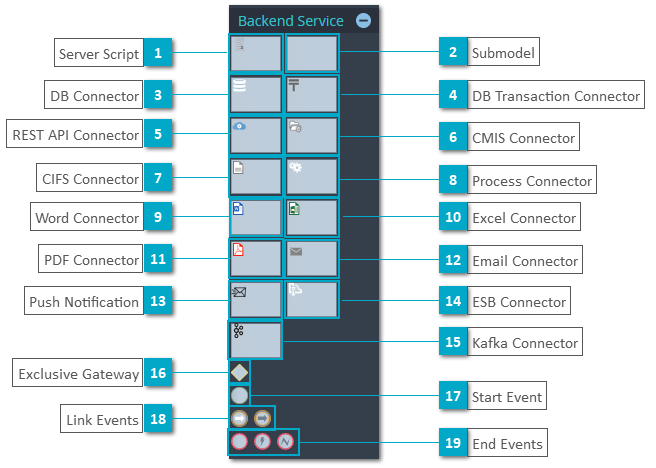
Backend Service Model Elements
-
Server Script - A script element provides the possibility to structure implementation scripts visually.
-
-
DB Connector - Use this element to execute DB queries by no-code.
-
DB Transaction Connector - Use this element to handle multiple queries in a single transaction.
-
REST API Connector - Use this REST API Connector element to integrate with external systems by no-code.
-
CMIS Connector - Use this connector to manage documents.
-
CIFS Connector - This element provides file and directory handling by no-code.
-
Process Connector - This element easily handles the integration with business processes, like start a process instance and send or receive messages.
-
Word Connector - This element allows to generate a word document or PDF based on placeholders.
-
Excel Connector - Use this element to manage Excel files by no-code.
-
PDF Connector - Use this element to manage PDF files by no-code.
-
Email Connector - Use this connector to send email and fetch emails.
-
Push Notification - Use this connector to push notifications.
-
ESB Connector - Use this connector to integrate different systems using message queues.
-
Kafka Connector - Use this connector to connect to an Apache Server.
-
Exclusive Gateway - Use an exclusive gateway element to structure implementation scripts.
-
Start Event - A service model must contain one start event element.
-
Link Events - Use Link Event elements as an alternative to a sequence flow to enhance the model structure and to avoid crossing flows for a better readability of complex flows.
-
End Events - A server service model can be terminated by a normal end event or by a business error end event or technical error end event
|
|
Additionally, the Service model contains the standard General Elements (Link, Image and Comment Elements).
 Server ScriptA server script element provides the possibility to structure implementation scripts visually.
|
|
 Submodel |
|
 DB ConnectorUse this element to execute DB queries by no-code.
|
|
 DB Transaction ConnectorUse this element to handle multiple queries in a single transaction.
|
|
 REST API ConnectorUse this REST API Connector element to integrate with external systems by no-code.
|
|
 CMIS ConnectorUse this connector to manage documents.
|
|
 CIFS ConnectorThis element provides file and directory handling by no-code.
|
|
 Process ConnectorThis element easily handles the integration with business processes, like start a process instance and send or receive messages by no-code.
|
|
 Word ConnectorThis element allows to generate a word document or PDF based on placeholders.
|
|
 Excel ConnectorUse this element to manage Excel files by no-code.
|
|
 PDF ConnectorUse this element to manage PDF files by no-code.
|
|
 Email ConnectorUse this connector to send email and fetch emails.
|
|
 Push NotificationUse this connector to push notifications.
|
|
 ESB ConnectorUse this connector to integrate different systems using message queues.
|
|
 Kafka ConnectorUse this connector to connect to Kafka Server and subscribe to topics to get messages.
|
|
 Exclusive GatewayUse a gateway element to structure implementation scripts by low-code.
|
|
 Start EventA service model must contain one start event element.
|
|
 Link EventsUse Link Event elements as an alternative to a sequence flow to enhance the model structure and to avoid crossing flows for a better readability of complex flows.
|
|
 End EventsA service model contains one or multiple end events.
A server service model can be terminated by a normal end event or by a business error end event or technical error end event (see Connector - Error handling). |
|