xAPPnow LOW CODE PLATFORM - User Manual 

Still no account yet?

×

Working with Models - Create Service Model Type

 
This topic describes the creation of service model types. we distinguish between frontend service models, executed on client side (e.g. browser) and backend service modesl, executed on the server side (e.g. Camunda process engine).
 
You can create a new model or from a template.
 
 
Frontend Service Model
 
The following dialog provides the creation of Frontend Service Model Types.
 
 
Working with Models - Create Service Model Type


Backend Service Model
 
The following dialog provides the creation of Backend Service Model Types.
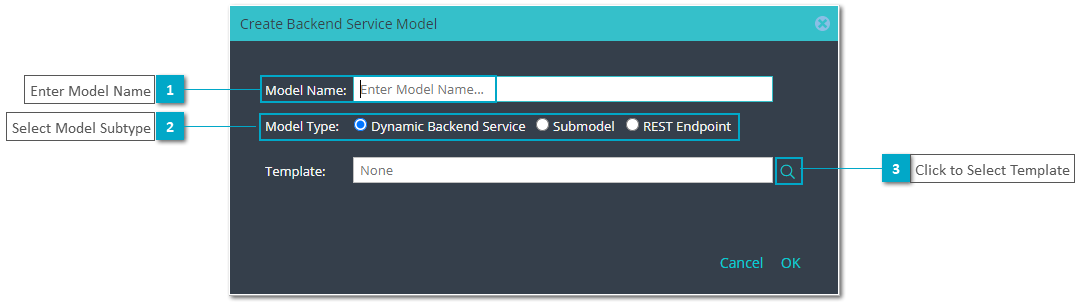
 
 
Working with Models - Create Service Model Type


1

Enter Model Name

1. Enter Model Name
Type a name for the model.
2

Select Model Type

2. Select Model Type
Select one of the types availables for Frontend Service Models.
3

Click to Select Template

3. Click to Select Template
This button opens dialog "Select Template" to choose a created model and use it as template.
 
1

Enter Model Name

1. Enter Model Name
Type a name for the model.
2

Select Model Subtype

2. Select Model Subtype
Select one of the types availables for Backend Service Models.
3

Click to Select Template

3. Click to Select Template
This button opens dialog "Select Template" to choose a created model and use it as template.


