Domain Administration - User Management
This topic describes the User Management of the of the xAPPnow Modeling Studio.
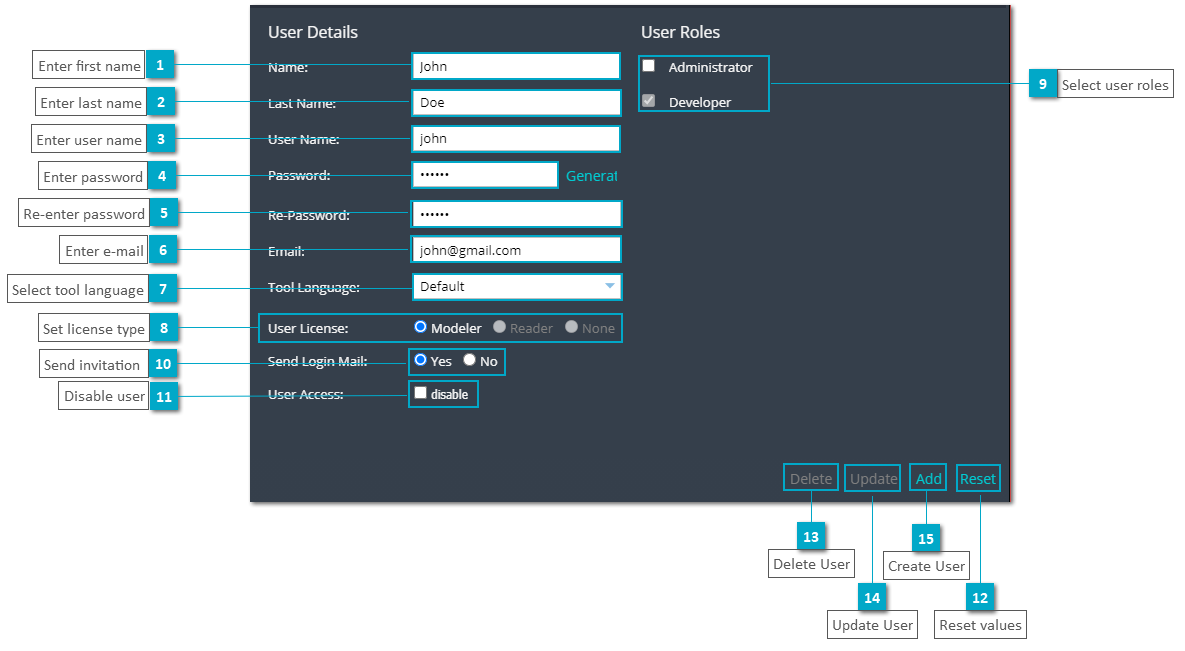
The following screenshot displays the dialog for the user management to create, update and delete users.
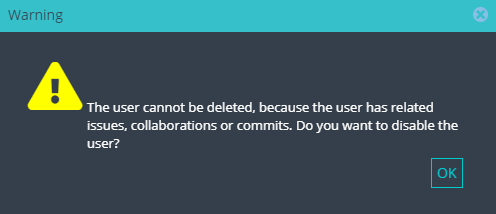
In case of an attempt to delete a user which is being used actively in a project, the following message will be shown.
 Enter first name
|
|
 Enter last name
|
|
 Enter user name
|
|
 Enter password
|
|
 Re-enter password
|
|
 Enter e-mail
|
|
 Select tool language
|
|
 Set license type
|
|
 Select user roles
|
|
 Send invitation Send invitation mail to change the password.
|
|
 Disable user
|
|
 Reset values
|
|
 Delete UserA user can only be deleted if he does not have any assigned commit, issue or collaboration. In this case the user has to be disabled.
|
|
 Update User
|
|
 Create User
|
|