xAPPnow LOW CODE PLATFORM - User Manual 

Still no account yet?

×

BPMN - Timer Intermediate Event Configuration


This topic describes the Low-Code Configuration of a BPMN Timer Intermediate Event, which is available in a Sub TAB of the Implementation TAB.
 
The following properties are available for this element:
 
  • Time Date: fixed date when the event will fire
  • Duration: duration after the event will fire (e.g. duration of 10 days: "P10D")
  • Interval: time interval, when and how often the event will fire (e.g. 3 repeating intervals, each lasting 10 hours: "R3/PT10H")
 
 
Remark: The timer configuration is according to ISO 8601. For further details see specific documentation (e.g. wikipedia).


BPMN - Timer Intermediate Event Configuration
 
 
1

Select timer type

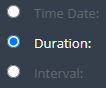
1. Select timer type
Select the type of the timer configuration:
  • Time Date: Configuration of a specific date&time (e.g. 2011-03-11T12:13:14Z)
  • Duration: Configuration of a specific time duration (e.g. duration of 10 days: "P10D")
  • Interval: Configuration of a repeating interval (e.g. 3 repeating intervals, each lasting 10 hours: "R3/PT10H")
2

Configure timer

2. Configure timer
Drag and drop the attribute on the timer configuration.
3

Delete mapped data

3. Delete mapped data
Click the delete button to remove the corresponding mapped data.