Complete UI Page "CreditRequest" - UI Elements
Chapter Overview
In this training chapter you will add various UI elements to UI page "CreditRequest", which displays a form to enter required data for a credit request.
Exercise
Exercise 1: Add UI Element for "Monthly Salary"
-
Step 1: Open UI page "Automation/User Interface/Training/UiPage/CreditRequest" in the model tree
-
Step 2: Drag&drop basic element "Label" into the first free span of the left below title "Customer Credit Request"

-
Step 3: Drag&drop basic element "TextField" into the span next to the label element
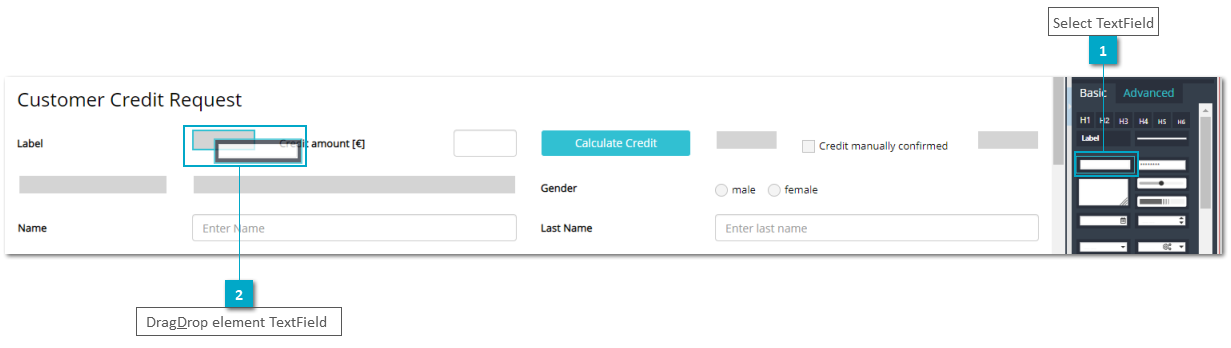
-
Step 4: Select textfield element to open TAB "Implementation" and then SubTAB "DataMapping"
-
Step 5: Enter "salary" in textfield "Search data" and press key "Enter" to find attribute "monthlySalary"
-
Step 6: Drag&drop attribute "monthlySalary" into field "Data Mapping"

-
Step 7: Open SubTAB "Visibility" to display visibility properties
-
Step 8: Double click at column "State" of property "Editable" and select value "Script" to enable the script area
-
Step 9: Enter script:
localData.customer.creditData.isRequestDialog;

Exercise 2: Add "Salutation" on referenced UI Panel "PersonPanel"
In this excercise you will add a combobox and a label for "Salutation" to a referenced UI panel by drag&drop the related attribute from TAB "Data" into a free span of the UI page.
-
Step 1: Double click at referenced UI panel "Referenced Panel" to navigate to UI panel "Automation/User Interface/Training/UiPanel/PersonPanel"
-
Step 2: Open TAB "Data" and select attribute "person.title"
-
Step 3: Drag&drop attribute "title" to second free span from the left to open dialog "Select Component"
-
Step 4: Keep selected UI component "ComboBox" and marked checkbox "Create Label" to define the UI components for attribute "title"
-
Step 5: Click button "OK" to create the UI components


Remark: The label will be added to the free span at the left side of the selected component. Therefore, this additional free span is required.

-
Step 6: Click button "Back to Parent Model“ in the toolbar to navigate back to parent model "CreditRequest"